Wednesday, 31 December 2008

Encrypting zips on OSX

If you are backing up or archiving to DVD or other non-ACL'd media, encryption is a desirable option. Sadly OSX doesn't have any good encrypted zip possibilities. Imagine if you backed up your profile to DVD, someone got hold of the backup and now has access to all those banking web sites with saved passwords etc. OK so they would need to get your keychain password, but there is a better way.

What we can do is to create an encrypted Disk Image using Disk Utility.

Go to File>New Disk Image from Folder


Select the folder you want to turn into a disk image.


Give it the correct options ie encrypted at 256bit, and what you want to call it

After a few seconds you get the box to apply your password

And then the disk images process continues. Be warned that 256 encrypted images even for small amount of data can take a long time to create. The folder I've used here had 800Mb of photos in in and it took about 20 minutes

Sunday, 28 December 2008

Slowing Down or Speeding Up Quicktime Movies

There is a manual method of slowing down or speeding up Quicktime movies which I wrote about a few months ago.

Now if you have the foresight to run OSX there is a utility to do this much easier. TransformMovie from www.limit-point.com
Link

Saturday, 27 December 2008

Remove the Navbar from Blogger

Removing the Navbar from Blogger may nor not be against the Terms of Service. I've not been able to find out. Anyway if you want to, here's how.

Go to "Dashboard", click on the "Layout” link for your blog, and then the “Edit HTML” link.

Look for the following lines

    Updated by: Blogger Team
    ----------------------------------------------- */

    /* Variable definitions
    ====================

and insert "#navbar-iframe {display: none !important;}" in there.


    Updated by: Blogger Team
    ----------------------------------------------- */

    #navbar-iframe {display: none !important;}

    /* Variable definitions
    ====================


Save and view your blog

Tuesday, 11 November 2008

Nikon D300 v 1.10 firmware

Nikon have released firmware v 1.10 for the D300.

It has the a fair selection of fixes and improvement. The ones that spring out to me are that you can now apply a photographer and copyright meta tag.

  • The Highlights playback display option has been moved from Display mode > Basic photo info > Highlights in the playback menu to Display mode > Detailed photo info > Highlights. 
  • The size and color of “Demo” displayed in the monitor with playback when No memory card? in the Custom Settings is set to Enable release, have been modified. 
  • The range of settings available for ISO sensitivity settings > ISO sensitivity auto control > Minimum shutter speed in the shooting menu has been increased from 1/250 – 1 s to 1/4000 – 1 s.
  • When shooting in hand-held live view mode and the frame is magnified prior to autofocusing, operation has been modified so that display returns to the magnified display rather than full-frame display. 
  • Images captured with Rotate tall, in the playback menu, set to On are not automatically rotated for display immediately after capture (image review).
  • A Copyright information item has been added to the setup menu. When Copyright information is enabled, the copyright symbol (©) is shown in the shooting info display. 
  • Recent settings can now be displayed in place of My Menu. 
  • Custom Setting e3 Flash cntrl for built-in flash (e3 Optional flash when an optional Speedlight is mounted on the camera) can now be added to My Menu using the Add items option in My Menu from Add items > Custom setting menu > e Bracketing/flash. 
  • The degree of the High ISO NR setting can now be confirmed in the shooting info display while the High ISO NR setting item, in the shooting menu, is being applied.
  • Ankara, Riyadh, Kuwait, and Manama have been added to the Time zone options for the World time item in the setup menu. 
  • When a GPS device is used and no heading information is available, ---.--° is now displayed for the Position > Heading option in the GPS item in the setup menu.
  • When shooting in live view mode using Camera Control Pro 2 (Ver. 2.2.0 or later) with a PC-E lens, the aperture setting can now be adjusted from the computer.
  • Focus acquisition performance in dynamic-area AF mode has been improved.
  • Focus acquisition performance with contrast-detect AF has been improved. 
  • Auto white balance performance has been improved.
  • The fourth digit in seconds display for GPS latitude and longitude information is now rounded off rather than omitted.
  • The current MB-D10 battery type setting can now be confirmed in the shooting info display when R6 / AA-size batteries are used with the Multi-Power Battery Pack MB-D10. 
  • An issue that caused an increase in noise with shooting in [M] exposure mode at a shutter speed setting of bulb with the shutter held open for less than 8 seconds and Long exp. NR enabled has been resolved. 
  • An issue that prevented shutter release at the specified shutter speed when no operations were performed for 30 seconds in mirror up mode has been resolved. 
  • An issue that caused abnormal image display when Image review was set to On and the playback zoom in button was pressed immediately after shooting at the following settings has been resolved. 
  •  Image quality: NEF (RAW ) + JPEG
  •  NEF (RAW) recording: Lossless compressed or Compressed
  •  Image size: S or M
  • When the Speedlight SB-800 was mounted on the camera with flash mode set to distance-priority manual (GN) mode, and the camera recovered from standby mode triggered by the auto meter off function, the distance information displayed on the SB-800 changed. This issue has been resolved.

Sunday, 9 November 2008

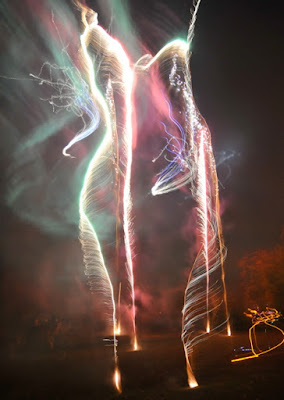
Pictures of Fireworks

From Fireworks November 2008


Trying to photograph fireworks is a very hit and miss business!

The first rule of photographing fireworks is that all the usual rules just do not apply!

I captured these pictures and other images
from Bonfire Night using the D300 and Tokina 12-24 lens on a tripod.

I used the following settings:

exposure: 5 seconds
aperture: f/4.5 and f/11
lens: 12mm = 18mm at 35mm equivalent
iso = 800

and I used an intervalometer to take photos after each other.

It looks to me, and you have to remember that the results are very random, that f/11 is not enough exposure, and f/4.5 is too much so I would reduce the exposure to say f/8.

It would also be worth trying a shorter shutter speed say 4 seconds, or longer say 6 seconds. But, if you get a nicer picture you won't necessarily be able to say it was due to a different setting.

Oh yes, the wind was blowing at about 5 to 10 miles per hour, which means the light traces are longer.

So less wind would require longer shutter and smaller aperture.

You've just got to try stuff!


From Fireworks November 2008

Saturday, 1 November 2008

MSI Wind / Advent 4211 - update to 10.5.5

You'll want to update to 10.5.5 since it has some security and other fixes in it. However for the hackintosh its a problem since it installs an incompatible kext 'AppleIntelCPUPowerManagement.kext' and this will cause a kernel panic and crash.

If you are in this situation then you can get yourself out using these instructions.

If you used any installer other than msiwindosx86 you'll need to do the following before you run the 10.5.5 updater

sudo su

while sleep 1 ; do rm -rf /System/Library/Extensions/AppleIntelCPUPowerManagement.kext ; done


handily msiwindosx86 uses disabler.kext to prevent the installation of the problematic kext.

After I updated, the machine started and then restarted and then started up OK. I then installed the updated kexts from rapidshare.com/files/156863271/MSIWindDrivers.mpkg.zip.

Another restart and things seem OK apart from the screen resolution which is wrong, and then I get a pop up that says some of the graphics drivers have not been installed correctly. So I re-installed AppleIntelGMA950.kext and AppleIntelIntegratedFramebuffer.kext using Kext Helper b7.

Another restart and the screen resolution is OK.

Thursday, 30 October 2008

Backup and Restore FileVault Home Directory

Using File Vault is a good idea because your home directory is then if your MacBook gets stolen then your data cannot be taken.

But copying the file vaulted home directory is tricky. For normal ie non file vault accounts you can just copy your entire directory eg /users/bob to somewhere, reformat or whatever, create an identical account same password, and then while logged in as Bob, copy everything back (though best not to be running any applications).

This doesn't work with file vault.

My way, maybe not the best but it works and I'm using a profile restored in this manner right now:

  1. use remote login
  2. cp -r source/bob.sparebundle /users/bob/bob.sparebundle